For many years I've been creating posters and postcards and even vinyl banners to advertize for Holy Week at Messiah (and at St. Mary Magdalene's when I was there). Usually they get a few people to come, so I think they are totally worth doing. I've been more hesitant to do real Facebook campaigns, partly because I simply haven't felt like I've had the time. But this year I'm full of energy and enthusiasm, so I'm giving it a shot (and it doesn't hurt that I saw my friends at Church of the Transfiguration are trying a Facebook campaign!). Time for to give it a try. Target: Palm Sunday.
Step one: Create a "landing page" for the campaign. Since I'm targeting the "Open de-Churched" for this campaign, I wrote an article on the church's blog explaining what Palm Sunday is all about. This is purely an attractional approach, of course, and had in mind the sort of people who might remember going to church, but don't quite remember what Palm Sunday about or why it's different from the usual week. It's a bit "teachy," maybe, but this is just my first attempt at a Facebook campaign, so, it is what it is!
Step two: create a tracking tag for Google Analytics. Using this tool I created a custom tag to append to URL links that are part of the campaign. That way I can tell, later, how much of the traffic that lands on this page did so specifically because of the campaign (rather than simply because they Googled "What is Palm Sunday").
Step three: create a post on Facebook on the Church's page. (Not strictly necessary, of course, but helpful.) Now that post is only two sentences, but it has a link to the article I wrote in step one, along with a thumbnail image from that article. I set this post to go live at 10am. Scheduling is a good idea for two reasons: 1) having it publish during a high-traffic time on Facebook means that it will appear current in people's timelines, rather than hours old, and 2) I can make changes and make sure everything is solid before it goes live.
Step four: set up the Facebook ad. I won't walk you through this except to say that's very simple. You can set a "budget" for the campaign, but in the end they only charge you for the actual click-throughs of your ad. I'll also mention that I used the tracking tag created in step two, so this campaign will show up in Google Analytics and I'll be able to see how it compares to other efforts to bring traffic to the website. I also scheduled this to run from this morning (after the Facebook post goes public, naturally) until the service starts Palm Sunday morning. I also targeted it specifically to the GTA. I could have narrowed it down even further, say to people in certain age ranges, but this campaign is not that highly targeted. However, it probably won't be very long before you can create ads targeted toward people who like certain things that might lead me to think they would be open to attending a certain kind of church event, for example. That's coming.
This first attempt is a short run (three days) and not very expensive ($50). So I'll be curious to see the results. I'll be able to see how many people clicked through the ad and how many people stumbled onto the landing page from other sources. And if there are any visitors on Sunday I will simply ask them, as well, how they found us. A lot of time it's simply from walking or driving by the building, so I'm already thinking of ways we could maximize that.
Is there a difference between this advertizing work and evangelism? Not really. You'll see that I'm not pulling some kind of bait of switch, the post on the church website is quite confessional. I'm clearly inviting people to hear more about Jesus and His story. If that's not Evangelism I'm not sure what is!
Showing posts with label computer. Show all posts
Showing posts with label computer. Show all posts
Thursday, March 21, 2013


Sunday, February 24, 2013
The Messiah Website Relaunch
The last few weeks have been a time of heightened productivity for me. Lent has always been a good time for me to knock through a bunch of projects, and part of that comes the place it occupies in the church year: things have settled in after the fall (when people come back to more frequent attendance), and the congregation has gotten through Christmas. By the time Lent comes around you, as the Rector or Pastor, know pretty well who you've got and what they are capable of. Also, you see the spring unfolding before you are realize that summer will be here before you know it, and advancing projects then will be difficult.
So.... for a long time I've wanted to re-do my church's website. The original website, while not bad, was "hard-coded" in HTML/CSS. That meant that in order to change the site, someone (me), had to manually edit each page or stylesheet. That wasn't a problem for me, I have Wordpress and know HTML well enough that I could easily make the pages do what I wanted, especially when I used Dreamweaver to do it. However, I quickly found the limitation to this approach: only I could change the site! So much for involving the people, let alone having another staff member do it, let alone delegating the various parts of the site to the people that might be passionate about them.
For several years the solution has been obvious. What I needed was a Content Management System (CMS)--preferably one that was open source and free. I considered Joomla for a time, but then Brian Bukowski (web manager at the Anglican Church of Canada) told me that I should look at Wordpress and I've been hooked ever since. It's dead-easy to install and customize, and there are tons of pre-designed "themes" available at all price points (including free). Modifying such themes is pretty easy, as well, as long you know HTML/CSS and a little PHP.
The problem, I found, was that my church's website was hosted by Bell, and their standard business webhosting package for medium-sized companies doesn't give you a database. In order to get that feature you have to upgrade to an exorbitant package. I asked a sales rep about purchases this service a la cart, and the price was similarly ridiculous given that most webhosting companies (like GoDaddy or iPage) throw that in with even their most basic plans. In general, Bell's webhosting sucks, anyway, with antiquated tools and interfaces. Even their webmail interface is terrible.
So I decided to switch the hosting over to iPage and I'm glad I did. I've used GoDaddy to set up websites in the past, and they are fine and very cheap. But I don't love the politics of their advertizing campaign (too sexist) and I've heard some rumblings around the web about some of their business practices. Ipage, on the other hand, had very good reviews on the web, and is said to be particularly good for non-US customers. I've been pleased with the results so far, and found the set-up to be straightforward. Like GoDaddy, iPage has a feature that allows you to automatically set up a WordPress installation on your site without having to upload the package and execute it manually.
After that I picked a theme. After spending a few hours looking at various themes--many of them developed especially for churches, I went with Epic Church by Organized Themes. Key features for me for this theme (and the others that made the final list) were these:
Some other themes I liked:
Once I had the theme installed I had to spend a few hours uploading content. In a few cases I was able to copy and paste some content developed for the old site, but most of the time I simply rewrote the copy to reflect our community's current situation. I have quite an archive of photographs, so I pulled out some new ones for the new site. I had to a little work in Photoshop in a few cases, but not much. Mainly that was just to get the photographs for the "slideshow" into the correct sizes. I created a macro in Photoshop to make batch-process files a snap.
I had to do a bit of troubleshooting to get a few features to work like I wanted, but it all did. So, presto, we have a new church website. I still have some features to implement and, of course, I'll need to add a lot more content. But at least we now have a workable platform. Now I can create separate logins to allow various members of the church to add content. They can even do so using apps on their smart phones!
You can check out the current site and see how it's coming along. Of course, if you are reading this sometime in the future, than the site will likely have gone through yet another face lift!
So.... for a long time I've wanted to re-do my church's website. The original website, while not bad, was "hard-coded" in HTML/CSS. That meant that in order to change the site, someone (me), had to manually edit each page or stylesheet. That wasn't a problem for me, I have Wordpress and know HTML well enough that I could easily make the pages do what I wanted, especially when I used Dreamweaver to do it. However, I quickly found the limitation to this approach: only I could change the site! So much for involving the people, let alone having another staff member do it, let alone delegating the various parts of the site to the people that might be passionate about them.
For several years the solution has been obvious. What I needed was a Content Management System (CMS)--preferably one that was open source and free. I considered Joomla for a time, but then Brian Bukowski (web manager at the Anglican Church of Canada) told me that I should look at Wordpress and I've been hooked ever since. It's dead-easy to install and customize, and there are tons of pre-designed "themes" available at all price points (including free). Modifying such themes is pretty easy, as well, as long you know HTML/CSS and a little PHP.
The problem, I found, was that my church's website was hosted by Bell, and their standard business webhosting package for medium-sized companies doesn't give you a database. In order to get that feature you have to upgrade to an exorbitant package. I asked a sales rep about purchases this service a la cart, and the price was similarly ridiculous given that most webhosting companies (like GoDaddy or iPage) throw that in with even their most basic plans. In general, Bell's webhosting sucks, anyway, with antiquated tools and interfaces. Even their webmail interface is terrible.
So I decided to switch the hosting over to iPage and I'm glad I did. I've used GoDaddy to set up websites in the past, and they are fine and very cheap. But I don't love the politics of their advertizing campaign (too sexist) and I've heard some rumblings around the web about some of their business practices. Ipage, on the other hand, had very good reviews on the web, and is said to be particularly good for non-US customers. I've been pleased with the results so far, and found the set-up to be straightforward. Like GoDaddy, iPage has a feature that allows you to automatically set up a WordPress installation on your site without having to upload the package and execute it manually.
After that I picked a theme. After spending a few hours looking at various themes--many of them developed especially for churches, I went with Epic Church by Organized Themes. Key features for me for this theme (and the others that made the final list) were these:
- Responsive design: it must display beautifully on any screen (desktops, smart phones, tablets, etc.)
- Built-in podcasting: it must have a sermon-media management tool
- E-mail newsletter support: it must have a way for people to subscribe to the parish newsletter
- Social media integration: it must have a way for people to like or share almost anything
Some other themes I liked:
Once I had the theme installed I had to spend a few hours uploading content. In a few cases I was able to copy and paste some content developed for the old site, but most of the time I simply rewrote the copy to reflect our community's current situation. I have quite an archive of photographs, so I pulled out some new ones for the new site. I had to a little work in Photoshop in a few cases, but not much. Mainly that was just to get the photographs for the "slideshow" into the correct sizes. I created a macro in Photoshop to make batch-process files a snap.
I had to do a bit of troubleshooting to get a few features to work like I wanted, but it all did. So, presto, we have a new church website. I still have some features to implement and, of course, I'll need to add a lot more content. But at least we now have a workable platform. Now I can create separate logins to allow various members of the church to add content. They can even do so using apps on their smart phones!
 |
| The old Messiah site |
 |
| The new Messiah site |
Wednesday, January 27, 2010
Drool....

This is the new Apple iPad. It is meant to be a middle step between cell phones and laptops. It has the potential to revolutionize print media the way iPods did for the music industry. The basic concept is that people will be able to download and view novels, newspapers, and other print media. More importantly, it will streamline the process whereby media companies can distribute and charge for such content.
You see, ever since the market for online advertising collapsed, outlets like the New York Times and CNN and the Wall Street Journal have been trying to figure out a new economic model. Old fashioned print is dying. People simply won't pay for something they can get for free on-line. But attempts to make customers pay for online content (say... by subscribing to the NY Times) have failed. The iPad has the potential to change all that by streamlining the process and making it virtually seamless in the way that music purchasing has become.
So the iPad is very special, indeed. Of course, other so-called Tablet PC's and e-reading devices have come and gone. So whether this one succeeds is still an open question, but I wouldn't bet against it!
-t
Saturday, September 12, 2009
Alan Turning (Finally) Gets an Apology
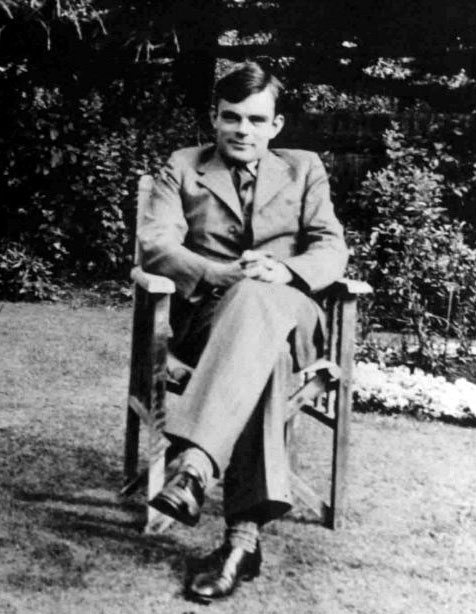
It's no exaggeration to say that Alan Turing was one of the greatest minds of the modern age. His work as a mathematician created the foundation for computer science. Even though crude computers were just being built, he came up with theories about Artificial Intelligence that are still influential. His contributions in other fields, such as Chemistry, that are also substantial.
His genius became essential to the Allied efforts to break the German Enigma Code in WWII. Working for the British Government, Turing created and refined methods to break the most complex cypher in use. it's difficult to imagine how difficult this problem was to solve, but to give you a sense: consider that there are 10 to the 22nd power possible combinations in the Enigma code. That means 1,000,000,000,000,000,000,000 possible codes. Turning figured out how to use a simple computer to test these possible solutions. To do this, he invented the logic behind "the bombe"--a cryptanalytic machine that tested possible Enigma code settings.
Professor Jack Good, cryptanalyst working at the time with Turing at Bletchley Park, later said: "Turing's most important contribution, I think, was of part of the design of the bombe, the cryptanalytic machine. He had the idea that you could use, in effect, a theorem in logic which sounds to the untrained ear rather absurd; namely that from a contradiction, you can deduce everything." (source)
Eventually his team was breaking 3,000 messages a day! We cannot underestimate how important this contribution was to the war effort.
Turing was relatively open about being homosexual during the war, but after the war was prosecuted for "Gross Indecency" and given the choice of chemical castration (through hormone injections) or jail. He chose castration and underwent the procedure. He was stripped of his security clearances. In 1954, a year after his conviction, he was found dead in his home from cyanide poisoning. The circumstances are ambiguous, which suggests that his death may have been accidental (from the careless handling of lab chemicals) or even murder. The assassination theory is based on the anxiety at the time of the KGB compromising people using homosexuality to entrap them. This was the time of the Cambridge Five, after all.
Suicide is the most likely answer. Indeed, he did report feeling hounded by the crown. The court-ordered hormone injections led to some disturbing side effects, like the growth of breasts, that he had to live with. He was only 41 when he died. Who knows what his contributions could have been had he lived longer.
Recently the British Government finally apologized for its treatment of Turing after the war. About time!
-t
Wednesday, July 22, 2009
Quick Update from the Monastery
I've been taking a break from blogging, for the most part, during my my vacation/retreat/work at Holy Cross, but I thought I would do a quick note to check-in.
Already this time at Holy Cross has been very special to me. Something about the silences and the overall deliberativeness of life here has been remarkably good for my soul. I feel totally at home and have been resting into the reality of this place. Lots of prayer and eating and meditating. The evening I went with Bede to an "Insight Meditation" group that meets nearby.
I've also been productive. The new version of the Holy Cross website is almost ready to go live--just a few pieces left to finish on the basic website. Then I'm going to really push myself to add some sophisticated CMS (Content Management System) tools to make editing the site easy for non-specialists. I'm also going to add some kind of on-line catalog/shopping cart kind of thing for the book store and possibly a way to see Guest House availability and even request reservations. What could possibly be next after that? How about a social networking site like Facebook, only for Holy Cross Associates and Monks? And did I mention the videos? I've already gotten some great content "in the can"--with the bulk of the interviews still left to do.
I know it sounds like a lot, but actually I've been making rapid progress. Feels good to have creative work balanced with prayer and mediation just about right.
-t
Already this time at Holy Cross has been very special to me. Something about the silences and the overall deliberativeness of life here has been remarkably good for my soul. I feel totally at home and have been resting into the reality of this place. Lots of prayer and eating and meditating. The evening I went with Bede to an "Insight Meditation" group that meets nearby.
I've also been productive. The new version of the Holy Cross website is almost ready to go live--just a few pieces left to finish on the basic website. Then I'm going to really push myself to add some sophisticated CMS (Content Management System) tools to make editing the site easy for non-specialists. I'm also going to add some kind of on-line catalog/shopping cart kind of thing for the book store and possibly a way to see Guest House availability and even request reservations. What could possibly be next after that? How about a social networking site like Facebook, only for Holy Cross Associates and Monks? And did I mention the videos? I've already gotten some great content "in the can"--with the bulk of the interviews still left to do.
I know it sounds like a lot, but actually I've been making rapid progress. Feels good to have creative work balanced with prayer and mediation just about right.
-t
Tuesday, July 14, 2009
Road Trip!

Last night I was exhausted by the time I picked up a friend from the airport and got home and had supper. Plans to pack up my computer last night dissolved under the influence of red wine and pizza! But I did manage to pack my suitcase.
This morning I got up at reasonable hour (7 A.M.) and loaded the car with the stuff I'm taking from home. Then I said goodbye to the cats and headed over to my office to do some last minute stuff (like burn CD's to listen to in the car) and pack up my computer. My computer ("ORAC") includes a VERY heavy full-tower unit that houses the drives and motherboard and all that, there are two-monitors and two external hard drives and a gazillion cords. But I couldn't imagine producing these videos for the Order without my workstation, so it was worth the effort.
After some last minute banking I finally got on the road at 11 a.m., but I made excellent time (7.5 hours) and managed to sneak in to the last part of supper before they cleared away the food! On the drive down I listened a pretty eclectic selection that included Tori Amos, Jay-Z, Neil Diamond, and even a bit of Enya! The border crossing into the U.S. was faster than usual and the roads were relatively clear. Being alone for a while gave me the chance to think through a number of things on my mind. I used to drive like this often all over Connecticut.
After supper I unpacked my car and went to a flute recital in the church. A well-known flutist is holding a "master class" workshop this week and kicked it off with a recital of his own. On Sunday afternoon the whole group will perform a concert together in the church. I attended it in years past when I was in Residency here, and I can tell you that the voice of the flute just sores in the church acoustic! Most of the students that come to study the flute here for an intensive week are already very committed and skillful, as you might expect! I also have permission to record the concert.
When I went to the recital this evening I noticed something right away. The windows were open. The city-sounds would make this unthinkable for a recital in Toronto, but out here all I could hear were a few faint song birds. I sort of forgot how quiet it can be outside until this afternoon!
The monks put me in the same rooms were in the last time I visited. Sort of a guest suite for Residents. It's quite, and very spacious. I set up one room as my office and still have a bedroom and a sitting room to spare! Once up a time this was the publications office. Long before that (when the building was built) I believe these were small chapels. Back then Anglo-Catholic priests (and back then all the Brothers of the Order were also priests) would say a Mass once a day as part of their vocational piety. To accomplish this in a house full of priests you naturally need a lot of little chapels! They would take turns saying the Mass and being the acolyte, then switching. No congregation except the heavenly hosts. All that changed after Vatican II, of course.
It's 11 P.M. and I'm exhausted. Time for bed. Mattins in the morning!
-t
Sunday, May 10, 2009
Cyber Warfare Games, West Point Style

Recently West Point Cadets participated in a War Game unlike the ones in the past. The cadets were required to establish a secure computer network and execute various tasks with that network. Meanwhile, hackers from the NSA attempted to infiltrate or disrupt the network using the most advanced methods available to them. And I imagine that the NSA has some pretty wicked tricks available to them! Just goes to show how information management is the new battlefield...
-t
Sunday, March 8, 2009
Video Workflow for the Geeky...
Okay, here's the workflow for posting that kind of video for those interested in such things...
I record the video of the service with a Canon HV-20 camcorder on a tripod at 1060i30 resolution. I also record the audio with an M-Audio Microtrack-II (MP3 at 224kbps / 44.1kHz) using a small stereo condenser mic clipped to the same stand that is holding the wireless handheld for the PA system).
I transfer the audio file to ORAC (my computer) and load it into Adobe Audition 3.0. I cut out the sermon, fix the levels and any problems, then save it at 128kps/44.1kHz and upload it to G-Cast where I can pull it later.
Next, I capture the video to my hard drive using HDVSplit. It's a very handy little app that does a good job of capture and happens to be free, too! Normally at this point I just capture what I need, as doing the whole tape takes about an hour.
In Adobe Premiere Pro CS3 I start a new project with the presets for 720p30. I copy and paste the title sequence from the last sermon video into the new project. I modify the things that need modifying and then put the new sermon video in place. Adjust the image, crop and zoom, etc. I then swap the audio track from the video camera with the audio I recorded with the Microtrack and sync them. This step, replacing the audio, makes a HUGE difference.
Once all that's done I export using the Adobe Media Encoder to a Flash video file (.flv) at 425X240, 29.97fps, 1.8kbps, using On2VP6 codec. 10 minutes equals about 150MB. I need to do some experimenting to find the right bandwidth sweet spot to get the size down, but that's not bad as long as my audience has broadband. Rendering an 11 minute file takes about 8 minutes thanks to ORAC's quad core.
At this point I upload the flv file to the COTM server using Dreamweaver (though you can FTP straight from Premiere Pro). I update an XML playlist to make sure the video gets pulled into my video player on the COTM website. And I can make a stand-alone viewing embed video (like the one below) using the same JWZ Player applet. Note that to pull videos from the COTM website onto the blog using the JWZ Player it is essential to have a "crossdomain.xml" file in the root directory of the COTM website.
I know, that sounds really complicated, doesn't it? In some ways it would be easier just to upload everything to You Tube or another video hosting website. But I like the added control of configuring my own player. I also like not being limited to the 10 minutes You Tube allows. Still, these 150MB files chew up server space real quick!
1ee7 users may note that I'm filming in 1060i and editing in 720p. The reason for that is simply that my video camera can't shoot in a progressive 30fps mode (not 720p nor 1080p), but flash does a better job with progressive video--so I have to deinterlace anyway and I might as well do so is such a way as to preserve some of the HD detail. Might be interesting to try the 1080p editing mode for comparison. But you really don't want to shink it down to 425X240 until the very end.
-t
I record the video of the service with a Canon HV-20 camcorder on a tripod at 1060i30 resolution. I also record the audio with an M-Audio Microtrack-II (MP3 at 224kbps / 44.1kHz) using a small stereo condenser mic clipped to the same stand that is holding the wireless handheld for the PA system).
I transfer the audio file to ORAC (my computer) and load it into Adobe Audition 3.0. I cut out the sermon, fix the levels and any problems, then save it at 128kps/44.1kHz and upload it to G-Cast where I can pull it later.
Next, I capture the video to my hard drive using HDVSplit. It's a very handy little app that does a good job of capture and happens to be free, too! Normally at this point I just capture what I need, as doing the whole tape takes about an hour.
In Adobe Premiere Pro CS3 I start a new project with the presets for 720p30. I copy and paste the title sequence from the last sermon video into the new project. I modify the things that need modifying and then put the new sermon video in place. Adjust the image, crop and zoom, etc. I then swap the audio track from the video camera with the audio I recorded with the Microtrack and sync them. This step, replacing the audio, makes a HUGE difference.
Once all that's done I export using the Adobe Media Encoder to a Flash video file (.flv) at 425X240, 29.97fps, 1.8kbps, using On2VP6 codec. 10 minutes equals about 150MB. I need to do some experimenting to find the right bandwidth sweet spot to get the size down, but that's not bad as long as my audience has broadband. Rendering an 11 minute file takes about 8 minutes thanks to ORAC's quad core.
At this point I upload the flv file to the COTM server using Dreamweaver (though you can FTP straight from Premiere Pro). I update an XML playlist to make sure the video gets pulled into my video player on the COTM website. And I can make a stand-alone viewing embed video (like the one below) using the same JWZ Player applet. Note that to pull videos from the COTM website onto the blog using the JWZ Player it is essential to have a "crossdomain.xml" file in the root directory of the COTM website.
I know, that sounds really complicated, doesn't it? In some ways it would be easier just to upload everything to You Tube or another video hosting website. But I like the added control of configuring my own player. I also like not being limited to the 10 minutes You Tube allows. Still, these 150MB files chew up server space real quick!
1ee7 users may note that I'm filming in 1060i and editing in 720p. The reason for that is simply that my video camera can't shoot in a progressive 30fps mode (not 720p nor 1080p), but flash does a better job with progressive video--so I have to deinterlace anyway and I might as well do so is such a way as to preserve some of the HD detail. Might be interesting to try the 1080p editing mode for comparison. But you really don't want to shink it down to 425X240 until the very end.
-t
Thursday, February 26, 2009
PAL to NTSC
So I bought some DVD's from England at the Fresh Expressions Conference. I get them home and discover that they won't play on my DVD player. Of course, I realized, they are in PAL format, not NTSC. The NTSC format is what we use for TV in North America and Japan. NTSC is what they use in the UK, Europe, and many other places. The difference, incidentally, came about back in the days with everything was analog and the power grid in North America cycled phases at 60Hz and the UK was on a 50Hz system. Back then it was easier to simply come up with a new format for a TV signal stream than make TV's smart enough to overcome the difference.
Anyway, it's not a big deal since you can buy PAL-compatible DVD players or simply play it on most computers. But I'm too much of a techie to let that go by. So I stopped by my local consumer video production outfit and they said they would be happy to do the conversion: for about $40-60/video! Yikes! So I decided to do it myself.
It turns out that doing the conversion yourself is not a straightforward process (unless you pay for software specifically designed to do it). So it took a few tries with various free video programmes until I finally cracked it and got a disc burned. Here's my path, for those of you interested such things.
I feel like I accomplished something figuring this out. And now I can give my wardens and others a DVD that will play in their home players!
-t
Anyway, it's not a big deal since you can buy PAL-compatible DVD players or simply play it on most computers. But I'm too much of a techie to let that go by. So I stopped by my local consumer video production outfit and they said they would be happy to do the conversion: for about $40-60/video! Yikes! So I decided to do it myself.
It turns out that doing the conversion yourself is not a straightforward process (unless you pay for software specifically designed to do it). So it took a few tries with various free video programmes until I finally cracked it and got a disc burned. Here's my path, for those of you interested such things.
- Copy the video files (VOBs) onto your hard drive. Remove any copy protections in the process. (I used DVD Shrink.)
- Transcode from 25fps to 30 fps. VSO DivxToDVD was supposed to work for this, but didn't. So I used the trial version of Blaze Media Pro instead.
- Build a new DVD using the transcoded files. I used Nero Vision for this, which isn't free, but there are similar programmes that will do the same thing.
I feel like I accomplished something figuring this out. And now I can give my wardens and others a DVD that will play in their home players!
-t
Thursday, February 5, 2009
Google Earth 5.0
Have you played around with Google Earth 5.0 (beta) yet? Why not? It's both free and cool! Google Earth is an application that allows you to view satellite and other imagery of pretty much anyplace on earth. You can zoom and fly around or look down from above or even go under the surface of the ocean to look at the terrain features there.
Of course it totally integrates with Google Streetview (not available for Canada yet for legal reasons) as well as Wikipedia. It's amazing how all these massive worlds of data are being brought together. Very cool.
-t
Of course it totally integrates with Google Streetview (not available for Canada yet for legal reasons) as well as Wikipedia. It's amazing how all these massive worlds of data are being brought together. Very cool.
-t
Tuesday, September 23, 2008
Website Updates
I made a bunch of updates to the COTM website today. I'd really fallen behind on a lot of that--so now I've added a bunch of stuff. I'm particularly pleased with the new "Donate" button that I put on every page. This makes it possible for people to quickly donate on-line to COTM. I also created a "Support our Ministry" page to make giving us money easier. There is also a large section about the mural with pretty pictures.
-t
-t
Tuesday, September 9, 2008
PhotoSynth of Children's Chapel
The folks at Microsoft just recently released a very, very cool web-application into Beta: PhotoSynth. It's an incredible way of stitching photographs into a 3-D universe that allows you to jump from photo-to-photo. Right now it's only available for PC (sorry Mac friends) and you need a high-bandwidth Internet connection to enjoy it. You'll also need to download a free browser plug-in. I know--that's a hassle, but the results are worth it! This is probably the coolest piece of software ever to come out of Microsoft.
-t
-t
Thursday, July 3, 2008
Wish List...
Today is my birthday. Someone asked me for my current wish list. It is...
Yes, I know, this is a tech-heavy list. But the fact is that I have plenty of books on my "must-read" shelf and have pretty much everything I "need"--so the only thing left to wish for is stuff that really is just about fun. Nothing wrong with that, right?
-t
- A PS3
- An iPod (either the Nano or the Classic) or, dare I ask, an iPhone? (available in Canada starting July 11)
- A small, CD-playing stereo for my office (with at least one stereo input or an iPod dock) Perhaps something like this. (or even a gift certificate for Bay Bloor Radio)
- Icons (particularly of Benedict, Mary Magdalene, and St. John the Baptist
- A nice kitchen timer
- An LCD Picture Frame
Yes, I know, this is a tech-heavy list. But the fact is that I have plenty of books on my "must-read" shelf and have pretty much everything I "need"--so the only thing left to wish for is stuff that really is just about fun. Nothing wrong with that, right?
-t
Thursday, March 27, 2008
Vista
So today I pulled the principle hard drive from my old computer and installed it into my new one to facilitate moving my e-mail, etc., over to the machine. So what work I did on my computer today I did on Vista 64. So far, it seems okay. Not much different from XP, really, which is to say that most of the problems that XP had are still there (although people do say it's a bit more crash-resistant than XP).
The real proof will come once I get the Adobe suite installed and start putting ORAC through his paces! I expect to have some problems with software that was designed to run on XP(32-bit), etc. Since the photos from Palm Sunday arrived today, I have PLENTY of content to start editing and putting onto the website. I also have my Easter Sermon to post. Of course, I made the current COTM website in Wordpad and could keep coding by hand if necessary, but editing the image, audio, and video files will require that I get the Adobe Suite going. (Or, worst case, alternative editors).
Today I brought Easter Communion to a couple unable to come to church for health reasons. As I'm not keeping Reserve Sacrament at COTM until I get my tabernacle (currently on order), I called down to Redeemer and they were more than happy to give me some of theirs. The couple I visited received me graciously and gave me some tea and "biscuits" after I gave them the sacrament. Nice people.
Life is good.
-t
The real proof will come once I get the Adobe suite installed and start putting ORAC through his paces! I expect to have some problems with software that was designed to run on XP(32-bit), etc. Since the photos from Palm Sunday arrived today, I have PLENTY of content to start editing and putting onto the website. I also have my Easter Sermon to post. Of course, I made the current COTM website in Wordpad and could keep coding by hand if necessary, but editing the image, audio, and video files will require that I get the Adobe Suite going. (Or, worst case, alternative editors).
Today I brought Easter Communion to a couple unable to come to church for health reasons. As I'm not keeping Reserve Sacrament at COTM until I get my tabernacle (currently on order), I called down to Redeemer and they were more than happy to give me some of theirs. The couple I visited received me graciously and gave me some tea and "biscuits" after I gave them the sacrament. Nice people.
Life is good.
-t
A Rubik's Cube Proof
A computer scientist managed to prove that any Rubik's Cube can be solved within 25 moves. He basically developed a way to mathematically model the "cube space" and the simplify the otherwise 43,252,003,274,489,856,000 combinations into sets (which still number in the billions). It took over 1500 hours of processing time on a quadcore workstation to solve each of those sets within 25 moves. Next he's going to attempt to prove that every cube is possible to solve in 24 moves.
I was always interested in creating a similar mathematical model to play every possible game of the "Free Cell" version of Solitaire. I know that not every "game" of Free Cell is winnable, but I wonder what the odds are that any given game is winnable. Some envelope-back calculations convinced me that the complexity involved means that actually solving each game would be near impossible by brute force. However, I could still get meaningful data by sampling possible decks.
Okay, now to REALLY geek-out: these kinds of problems would be instantly solvable by means of a "quantum computer." Such a computer basically leverages a weird by-product of quantum physics to essentially solve a problem by imagining every possible value of every variable simultaneously. In fact, any problem that could be expressed mathematically as a result of variables interacting could be solved in this way. It's possibly the ultimate computer. There is a lot of money going towards this kind of computing, particularly as the physical limitations of transistor-based computing begins to crowd Moore's Law. (Moore's Law predicts the infinite and exponential increase in power of computers over time.) A quantum computer would also be able to do things like break a cypher nearly instantly. (Current methods of simply guessing possible codes are limited.)
Anyway, it's not science fiction--small-scale quantum computers have already been built and demonstrated. When they get bigger, they will be very good at solving probability-based problems.
Obviously, computers have been on my mind the last few days...
-t
I was always interested in creating a similar mathematical model to play every possible game of the "Free Cell" version of Solitaire. I know that not every "game" of Free Cell is winnable, but I wonder what the odds are that any given game is winnable. Some envelope-back calculations convinced me that the complexity involved means that actually solving each game would be near impossible by brute force. However, I could still get meaningful data by sampling possible decks.
Okay, now to REALLY geek-out: these kinds of problems would be instantly solvable by means of a "quantum computer." Such a computer basically leverages a weird by-product of quantum physics to essentially solve a problem by imagining every possible value of every variable simultaneously. In fact, any problem that could be expressed mathematically as a result of variables interacting could be solved in this way. It's possibly the ultimate computer. There is a lot of money going towards this kind of computing, particularly as the physical limitations of transistor-based computing begins to crowd Moore's Law. (Moore's Law predicts the infinite and exponential increase in power of computers over time.) A quantum computer would also be able to do things like break a cypher nearly instantly. (Current methods of simply guessing possible codes are limited.)
Anyway, it's not science fiction--small-scale quantum computers have already been built and demonstrated. When they get bigger, they will be very good at solving probability-based problems.
Obviously, computers have been on my mind the last few days...
-t
Tuesday, March 25, 2008
Project: ORAC part 2
Yesterday I spent about 8 hours on my computer re-build project. I've decided to name him ORAC. Double-geek points if you know what ORAC is without following the link to Wikipedia.
Eight hours was long enough to assemble the whole thing from the parts and get Vista installed (thought not completely working, yet). I didn't run into any insurmountable obstacles, but this is by far the most complex computer build I've done to date. Lots of little, sensitive pieces. A few highlights:
- Quad-Core (Extreme Edition) Intel CPU
- 4 GB DDR3 RAM
- Asus Formula Extreme Motherboard (including water-cooled North-Bridge)
- Two 750 GB Hard-Drives in RAID 0 configuration
- Two ATI Radeon 3870 Video Cards
Of course, running plastic tubing with pressurized water through a case of precision electronics is a little nerve-wracking, but I managed it with only one leak! Luckily, I used a non-electrically conductive fluid in the loop--specially made for the task. This stuff also changes color from orange to green depending on the ambient light spectrum (cool, heh).
This whole system comprises a blazing fast workstation that will be great for video, audio, and still-image editing. The shear processing horsepower will make short work of the otherwise time-intensive work of transcoding video from one format to another. Even opening a 1.5 hour MP3 recording of the service into my editing program takes about 15 minutes with my current set-up (which ain't weak).
Of course, all this hardware depends on a working operating system! Vista (64-bit edition) loaded okay (it only took 26 minutes), but then I ran into problems getting the video cards' drivers to work. This whole driver issue has been a problem for many of the Vista early adopters, but I think I know how to fix it tomorrow. Eventually I plan to make this computer a dual-boot Vista/Linux system, so that I boot either operating system. Linux can be much more efficient for certain kinds of tasks, and mastering it will be a good challenge. I like learning new geeky skills.
What to with my old box? Maybe make it into a media file server for home? Perhaps. It's already four years old, so I won't get very much for selling it....
Here are some pictures of the build...

The components laid out. Note the bottle of orange liquid cooling fluid.

Assembling the motherboard.

Denise supervises as I assemble the hard drive cage.

Me, liking my life.


The completed motherboard assembly. Note the plastic tubing for liquid to flow from the CPU cooling block to the motherboard's cooling block. You can also see the impressive silver-colored heat sinks of the two RAM modules.

ORAC completed. Note the radiator on the back of the case and the wide tubes within.
-t
Saturday, March 22, 2008
The Wonders of Technology
BTW, if any of you are trying to send me an e-mail yesterday or today it will probably bounce back. Basically, Bell failed to update a certain configuration file for e-mail on their end, so my e-mail is broken until Monday, sigh.
-t
-t
Friday, March 14, 2008
What Makes me an Uber Geek
How can I claim to be an Uber Geek? How about these badges of honor?
-t
- I type in Dvorak
- My Calculator uses Reverse Polish Notation
- I build my own computers
- I still watch Dr. Who
- But I do miss Blake's 7
-t
Friday, March 7, 2008
Project: ORAC Part 1
This week I ordered the first of the parts for my computer rebuild. They included a Thermaltake Black Armor Full-Tower ATX Case, An Asus Maximus Extreme Motherboard, and an Intel Core 2 Extreme Quad-Core Processor (3.0 GHz). This is just the beginning of what is going to be one bad-ass workstation. My intention is to get back into creating websites for the church, and that means being able to edit image, sound, and video files. With my current computer I can do those first two fairly easily, but editing video has been difficult and inefficient. The transcoding alone (taking it from one format to another) takes hours with my single Pentium 4. More than quadrupling my processor power ought to help with all kinds of media-creation tasks.
I'm also looking forward to the craftsmanship aspect of the project. the "Leviathan" is going to require some new skills from me. I've never done water-cooling, for example, until now. That's right, my computer will use a system of circulating water to cool down some critical components. Stay tuned for more updates as I assemble the components...
-t
I'm also looking forward to the craftsmanship aspect of the project. the "Leviathan" is going to require some new skills from me. I've never done water-cooling, for example, until now. That's right, my computer will use a system of circulating water to cool down some critical components. Stay tuned for more updates as I assemble the components...
-t
Saturday, February 23, 2008
Hard Drive Failure
Uhhg--one of my three Hard Drives seems to have failed. It's a 360GB Maxtor drive that I use for storing media like MP3 files and all my Digital Picture files. I'd say I've got backups for less than a third of that, so if it's completely unrecoverable than I'm in trouble. My entire digital music collection is on that drive, along with thousands of photos I've taken or collected over the years. Right now it is emmitted a strange sound when it powers up. Not good.
But... I've been getting some weird behavior from my motherboard so I'm hoping it's just a bad controller. The verdict will come when I try to hook up the drive to a new motherboard and see how that goes. Incidentally, check out the motherboard I'm thinking of basing my new system on...

Note the integrated water-block. That means that the board uses a water-based cooling system; it's more efficient than traditional air, but also harder to set-up. Definitely a 1337 kind of deal. But it also makes for a faster and quieter computer.
Sorry to geek out on loyal readers--but I do like to be well-rounded in my interests!
-t
But... I've been getting some weird behavior from my motherboard so I'm hoping it's just a bad controller. The verdict will come when I try to hook up the drive to a new motherboard and see how that goes. Incidentally, check out the motherboard I'm thinking of basing my new system on...
Note the integrated water-block. That means that the board uses a water-based cooling system; it's more efficient than traditional air, but also harder to set-up. Definitely a 1337 kind of deal. But it also makes for a faster and quieter computer.
Sorry to geek out on loyal readers--but I do like to be well-rounded in my interests!
-t
Subscribe to:
Posts (Atom)